* Release 0.5.0 of Xen PV drivers for Windows
@ 2007-12-20  9:58 James Harper
  2007-12-20 15:12 ` Pasi Kärkkäinen
  2007-12-22 22:19 ` Trying to use Xen PV drivers for Windows (Release 0.5.0) Igor Chubin
  0 siblings, 2 replies; 9+ messages in thread
From: James Harper @ 2007-12-20  9:58 UTC (permalink / raw)
  To: xen-users, xen-devel

This message is to announce the 0.5.0 release of my GPL Xen PV drivers
for Windows. Still considered alpha software - test very carefully
before you even consider running it on a production system. Network
drivers are included but are not currently working.

The source is available at:
http://xenbits.xensource.com/ext/win-pvdrivers.hg
And a pre-compiled binary at (i386 XP & 2K3 only):
http://www.meadowcourt.org/WindowsXenPV-0.5.0.zip

Updates since last time:
. It's now a scsi miniport driver
. CDROM works
. Works under XP as well as 2K3
. Graceful shutdown service (responds to xm shutdown/reboot)

Known issues:
. xm reboot hangs at the end of the shutdown instead of rebooting
. Network drivers don't currently work (Andy Grover is working on these)
. Users of the previous release reported some issues that I couldn't
reproduce, but they all seemed to be on Intel based system and my only
test environment is AMD... any feedback on this release would be greatly
appreciated.
. 32 bit only at this point.
. When the PV drivers are responsible for the boot disk, crash dumps
don't work.

Any and all feedback welcome.

James

^ permalink raw reply	[flat|nested] 9+ messages in thread
* Re: Release 0.5.0 of Xen PV drivers for Windows
  2007-12-20  9:58 Release 0.5.0 of Xen PV drivers for Windows James Harper
@ 2007-12-20 15:12 ` Pasi Kärkkäinen
  2007-12-22 22:19 ` Trying to use Xen PV drivers for Windows (Release 0.5.0) Igor Chubin
  1 sibling, 0 replies; 9+ messages in thread
From: Pasi Kärkkäinen @ 2007-12-20 15:12 UTC (permalink / raw)
  To: James Harper; +Cc: xen-devel

On Thu, Dec 20, 2007 at 08:58:32PM +1100, James Harper wrote:
> This message is to announce the 0.5.0 release of my GPL Xen PV drivers
> for Windows. Still considered alpha software - test very carefully
> before you even consider running it on a production system. Network
> drivers are included but are not currently working.
>
> The source is available at:
> http://xenbits.xensource.com/ext/win-pvdrivers.hg
> And a pre-compiled binary at (i386 XP & 2K3 only):
> http://www.meadowcourt.org/WindowsXenPV-0.5.0.zip
>
> Updates since last time:
> . It's now a scsi miniport driver
> . CDROM works
> . Works under XP as well as 2K3
> . Graceful shutdown service (responds to xm shutdown/reboot)
>
> Known issues:
> . xm reboot hangs at the end of the shutdown instead of rebooting
> . Network drivers don't currently work (Andy Grover is working on these)
> . Users of the previous release reported some issues that I couldn't
> reproduce, but they all seemed to be on Intel based system and my only
> test environment is AMD... any feedback on this release would be greatly
> appreciated.
> . 32 bit only at this point.
> . When the PV drivers are responsible for the boot disk, crash dumps
> don't work.
>
> Any and all feedback welcome.
>

Really good work!

Btw how did you solve the problem you had earlier with the scsi miniport stuff?

Any comments about expected performance at this point? Is it already
optimized or still in the "features first, optimization later"-mode?

Can't test atm, but will do that later.

-- Pasi

^ permalink raw reply	[flat|nested] 9+ messages in thread
* Trying to use Xen PV drivers for Windows (Release 0.5.0)
  2007-12-20  9:58 Release 0.5.0 of Xen PV drivers for Windows James Harper
  2007-12-20 15:12 ` Pasi Kärkkäinen
@ 2007-12-22 22:19 ` Igor Chubin
  2007-12-22 23:01   ` [Xen-users] " Igor Chubin
  2007-12-23  9:03   ` James Harper
  1 sibling, 2 replies; 9+ messages in thread
From: Igor Chubin @ 2007-12-22 22:19 UTC (permalink / raw)
  To: James Harper; +Cc: xen-devel, xen-users


Hello James,


Thank you for you work,
it'r really interesting and really useful.

No about my experiments and problems.


I have tried to install your drivers into Windows XP.
I have downloaded the drivers from [1],
unzipped it and installed it as describe in
the INSTALL.txt.

The installation process was exactly as you have described
in the INSTALL.txt file. No any errors.

After that I have modified boot.ini (added new boot variant
with the /gplpv key) and rebooted the system.

I have tried to boot using the second boot option in the boot menu
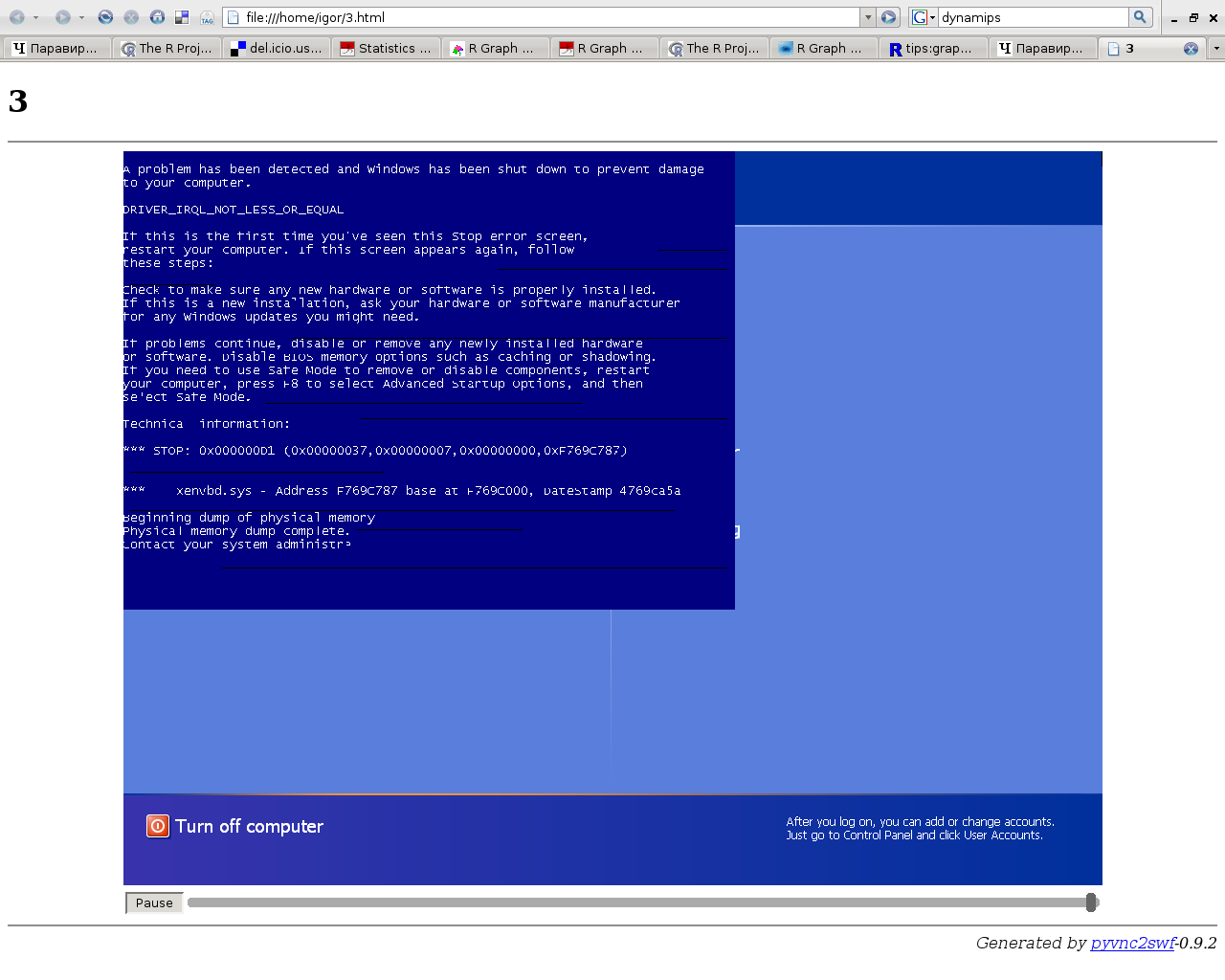
(/gplpv) and have got blue screen of death
(it appeared just after a second as a I have pressed enter in
the boot menu).

I have tried to boot using the first boot option in the boot menu
(without /gplpv). The system have booted without any problem.
After that I have tried to make hot block-attach to
the domain.

sudo lvcreate -n winpv -L 2G /dev/MAIN
sudo xm block-attach 13 phy:/dev/MAIN/winpv /dev/hdd w

(where 13 is the id of the windows domain)


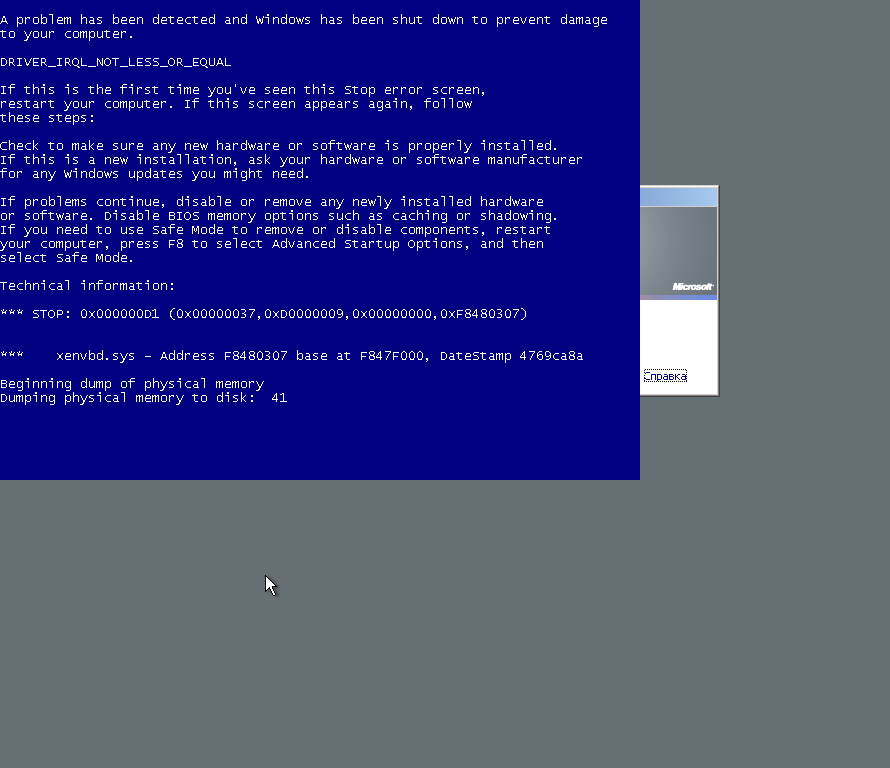
Just after I issue the command Windows goes into blue screen of
death. There are the message on th screen:

DRIVER_IRQL_NOT_LESS_OR_EQUAL
....
Technical information:
*** STOP: .....

***    xenvbd.sys  - Address FC769C787 base at ....


You can take a look at the shot of the screen with the error here [2].


I have tried to change the domain configuration.
I played with acpi, apic and pae parameters.
Domain didn't want to boot in any combination except

apic=1
acpi=1
pae=1

This one was used before I've started to change apic/acpi/pae
parameters. At least I've reverted back to it.

Also I have tried to disable CDROM in the pv domain.
Without success.


Thank you for your any ideas.
And once again thank you for you work


[1] http://www.meadowcourt.org/WindowsXenPV-0.5.0.zip
[2] http://xgu.ru/download/xenpvwindows.png


====================================================================================


igor@cholpon:~$ sudo xm dmesg
 Xen version 3.1-1 (Debian 3.1.1-1) (waldi@debian.org) (gcc version 4.2.3 20071014 (prerelease) (Debian 4.2.2-3)) Sat Oct 20 09:40:12
 UTC 2007
 Latest ChangeSet: unavailable

(XEN) Command line: dom0_mem=1024000
(XEN) Video information:
(XEN)  VGA is text mode 80x25, font 8x16
(XEN)  VBE/DDC methods: V2; EDID transfer time: 1 seconds
(XEN) Disc information:
(XEN)  Found 2 MBR signatures
(XEN)  Found 2 EDD information structures
(XEN) Xen-e820 RAM map:
(XEN)  0000000000000000 - 000000000009f000 (usable)
(XEN)  000000000009f800 - 00000000000a0000 (reserved)
(XEN)  00000000000f0000 - 0000000000100000 (reserved)
(XEN)  0000000000100000 - 00000000cfff0000 (usable)
(XEN)  00000000cfff0000 - 00000000cfff3000 (ACPI NVS)
(XEN)  00000000cfff3000 - 00000000d0000000 (ACPI data)
(XEN)  00000000d0000000 - 00000000e0000000 (reserved)
(XEN)  00000000f0000000 - 00000000f8000000 (reserved)
(XEN)  00000000fec00000 - 0000000100000000 (reserved)
(XEN)  0000000100000000 - 0000000130000000 (usable)
(XEN) System RAM: 4095MB (4193852kB)
(XEN) Xen heap: 9MB (10096kB)
(XEN) Domain heap initialised: DMA width 32 bits
(XEN) PAE enabled, limit: 16 GB
(XEN) Processor #0 15:3 APIC version 16
(XEN) Processor #1 15:3 APIC version 16
(XEN) IOAPIC[0]: apic_id 2, version 17, address 0xfec00000, GSI 0-23
(XEN) Enabling APIC mode:  Flat.  Using 1 I/O APICs
(XEN) Using scheduler: SMP Credit Scheduler (credit)
(XEN) Detected 3015.500 MHz processor.
(XEN) AMD SVM: ASIDs disabled.
(XEN) HVM: SVM enabled
(XEN) CPU0: AMD Athlon(tm) 64 X2 Dual Core Processor 6000+ stepping 03
(XEN) Mapping cpu 0 to node 255
(XEN) Booting processor 1/1 eip 90000
(XEN) Mapping cpu 1 to node 255
(XEN) AMD: Disabling C1 Clock Ramping Node #0
(XEN) AMD SVM: ASIDs disabled.
(XEN) CPU1: AMD Athlon(tm) 64 X2 Dual Core Processor 6000+ stepping 03
(XEN) Total of 2 processors activated.
(XEN) ENABLING IO-APIC IRQs
(XEN)  -> Using new ACK method
(XEN) ..MP-BIOS bug: 8254 timer not connected to IO-APIC
(XEN)  works.
(XEN) Platform timer overflows in 8589 jiffies.
(XEN) Platform timer is 25.000MHz HPET
(XEN) Brought up 2 CPUs
(XEN) *** LOADING DOMAIN 0 ***
(XEN)  Xen  kernel: 32-bit, PAE, lsb
(XEN)  Dom0 kernel: 32-bit, PAE, lsb, paddr 0xc0100000 -> 0xc0396b54
(XEN) PHYSICAL MEMORY ARRANGEMENT:
(XEN)  Dom0 alloc.:   000000003e000000->000000003f000000 (251904 pages to be allocated)
(XEN) VIRTUAL MEMORY ARRANGEMENT:
(XEN)  Loaded kernel: c0100000->c0396b54
(XEN)  Init. ramdisk: c0397000->c0dffe00
(XEN)  Phys-Mach map: c0e00000->c0efa000
(XEN)  Start info:    c0efa000->c0efa46c
(XEN)  Page tables:   c0efb000->c0f08000
(XEN)  Boot stack:    c0f08000->c0f09000
(XEN)  TOTAL:         c0000000->c1000000
(XEN)  ENTRY ADDRESS: c0100000
(XEN) Dom0 has maximum 2 VCPUs
(XEN) Initrd len 0xa68e00, start at 0xc0397000
(XEN) Scrubbing Free RAM: .............................done.
(XEN) Xen trace buffers: disabled
(XEN) Std. Loglevel: Errors and warnings
(XEN) Guest Loglevel: Nothing (Rate-limited: Errors and warnings)
(XEN) Xen is relinquishing VGA console.
(XEN) *** Serial input -> DOM0 (type 'CTRL-a' three times to switch input to Xen).
(XEN) Freed 96kB init memory.
(XEN) ioapic_guest_write: apic=0, pin=2, old_irq=-1, new_irq=0
(XEN) ioapic_guest_write: old_entry=00010000, new_entry=000009f0
(XEN) ioapic_guest_write: Installing bogus unmasked IO-APIC entry!
(XEN) grant_table.c:264:d0 Bad flags (0) or dom (0). (expected dom 0)
(XEN) grant_table.c:264:d0 Bad flags (0) or dom (0). (expected dom 0)
(XEN) grant_table.c:264:d0 Bad flags (0) or dom (0). (expected dom 0)
(XEN) grant_table.c:264:d0 Bad flags (0) or dom (0). (expected dom 0)
(XEN) grant_table.c:264:d0 Bad flags (0) or dom (0). (expected dom 0)
(XEN) grant_table.c:264:d0 Bad flags (0) or dom (0). (expected dom 0)
(XEN) grant_table.c:264:d0 Bad flags (0) or dom (0). (expected dom 0)


igor@cholpon:~$ sudo xm info
host                   : cholpon
release                : 2.6.18-4-xen-686
version                : #1 SMP Thu May 10 03:24:35 UTC 2007
machine                : i686
nr_cpus                : 2
nr_nodes               : 1
sockets_per_node       : 1
cores_per_socket       : 2
threads_per_core       : 1
cpu_mhz                : 3015
hw_caps                : 178bfbff:ebd3fbff:00000000:00000010:00002001:00000000:0000001f
total_memory           : 4095
free_memory            : 2344
xen_major              : 3
xen_minor              : 1
xen_extra              : -1
xen_caps               : xen-3.0-x86_32p hvm-3.0-x86_32 hvm-3.0-x86_32p
xen_scheduler          : credit
xen_pagesize           : 4096
platform_params        : virt_start=0xf5800000
xen_changeset          : unavailable
cc_compiler            : gcc version 4.2.3 20071014 (prerelease) (Debian 4.2.2-3)
cc_compile_by          : waldi
cc_compile_domain      : debian.org
cc_compile_date        : Sat Oct 20 09:40:12 UTC 2007
xend_config_format     : 4


igor@cholpon:~$ grep -v ^# /etc/xen/windowsxp-hvm | grep -xv ''
kernel = "hvmloader"
builder='hvm'
memory = 412
shadow_memory = 8
name = "windowsxp-hvm"
vcpus=1
pae=1
acpi=1
apic=1
vif = [ 'type=ioemu, bridge=service0, mac=00:16:3e:03:00:c1' ]
disk = [ 'file:/xen/images/windowsxp-hvm.img,hda,w' ] # , 'file:/Volumes/ISO/windows-xp-pro-sp2.iso,hdc:cdrom,r' ]
device_model = 'qemu-dm'
boot="c"
sdl=0
vnc=1
vncpasswd=''
stdvga=0
serial='pty'
usb=1


--
WBR, i.m.chubin

^ permalink raw reply	[flat|nested] 9+ messages in thread
* Re: [Xen-users] Trying to use Xen PV drivers for Windows (Release 0.5.0)
  2007-12-22 22:19 ` Trying to use Xen PV drivers for Windows (Release 0.5.0) Igor Chubin
@ 2007-12-22 23:01   ` Igor Chubin
  2007-12-23  1:22     ` Emre Erenoglu
  2007-12-23  9:03   ` James Harper
  1 sibling, 1 reply; 9+ messages in thread
From: Igor Chubin @ 2007-12-22 23:01 UTC (permalink / raw)
  To: James Harper; +Cc: xen-devel, xen-users


Hello, once again,

I have tried to install PV drivers
on Windows 2003 Server.

I have got exactly the error [1].


[1] http://xgu.ru/download/xenpvwindows2K3.png

--
WBR, i.m.chubin

^ permalink raw reply	[flat|nested] 9+ messages in thread
* Re: Trying to use Xen PV drivers for Windows (Release 0.5.0)
  2007-12-22 23:01   ` [Xen-users] " Igor Chubin
@ 2007-12-23  1:22     ` Emre Erenoglu
  2007-12-23  3:02       ` [Xen-users] " James Harper
  0 siblings, 1 reply; 9+ messages in thread
From: Emre Erenoglu @ 2007-12-23  1:22 UTC (permalink / raw)
  To: Igor Chubin; +Cc: James Harper, xen-devel, xen-users


[-- Attachment #1.1: Type: text/plain, Size: 706 bytes --]

Hi James, thanks a lot for the great work. One question:

- Are these drivers tied to a specific version of Xen Hypervisor? i.e. shall
we use it with released 3.1.0, or can I use it with any hypervisor version
including 3.2 unstable?

Thanks,

Emre

On Dec 23, 2007 1:01 AM, Igor Chubin <igor@chub.in> wrote:

>
> Hello, once again,
>
> I have tried to install PV drivers
> on Windows 2003 Server.
>
> I have got exactly the error [1].
>
>
> [1] http://xgu.ru/download/xenpvwindows2K3.png
>
> --
> WBR, i.m.chubin
>
>
> _______________________________________________
> Xen-users mailing list
> Xen-users@lists.xensource.com
> http://lists.xensource.com/xen-users
>


--
Emre Erenoglu
erenoglu@gmail.com

[-- Attachment #1.2: Type: text/html, Size: 1281 bytes --]

[-- Attachment #2: Type: text/plain, Size: 137 bytes --]

_______________________________________________
Xen-users mailing list
Xen-users@lists.xensource.com
http://lists.xensource.com/xen-users

^ permalink raw reply	[flat|nested] 9+ messages in thread
* RE: [Xen-users] Trying to use Xen PV drivers for Windows (Release 0.5.0)
  2007-12-23  1:22     ` Emre Erenoglu
@ 2007-12-23  3:02       ` James Harper
  0 siblings, 0 replies; 9+ messages in thread
From: James Harper @ 2007-12-23  3:02 UTC (permalink / raw)
  To: Emre Erenoglu, Igor Chubin; +Cc: xen-devel, xen-users

> Hi James, thanks a lot for the great work. One question:
>
> - Are these drivers tied to a specific version of Xen Hypervisor? i.e.
> shall we use it with released 3.1.0, or can I use it with any
hypervisor
> version including 3.2 unstable?
>

I've only really tested it with 3.1.x (worked), and one accidental
attempt with 3.0.x (didn't work).

James

^ permalink raw reply	[flat|nested] 9+ messages in thread
* RE: Trying to use Xen PV drivers for Windows (Release 0.5.0)
  2007-12-22 22:19 ` Trying to use Xen PV drivers for Windows (Release 0.5.0) Igor Chubin
  2007-12-22 23:01   ` [Xen-users] " Igor Chubin
@ 2007-12-23  9:03   ` James Harper
  2007-12-23  9:49     ` Igor Chubin
  1 sibling, 1 reply; 9+ messages in thread
From: James Harper @ 2007-12-23  9:03 UTC (permalink / raw)
  To: Igor Chubin; +Cc: xen-devel, xen-users

> Hello James,
>
> Thank you for you work,
> it'r really interesting and really useful.
>
> No about my experiments and problems.
>
> I have tried to install your drivers into Windows XP.
> I have downloaded the drivers from [1],
> unzipped it and installed it as describe in
> the INSTALL.txt.
>
> The installation process was exactly as you have described
> in the INSTALL.txt file. No any errors.
>
> After that I have modified boot.ini (added new boot variant
> with the /gplpv key) and rebooted the system.
>
> I have tried to boot using the second boot option in the boot menu
> (/gplpv) and have got blue screen of death
> (it appeared just after a second as a I have pressed enter in
> the boot menu).
>
> I have tried to boot using the first boot option in the boot menu
> (without /gplpv). The system have booted without any problem.
> After that I have tried to make hot block-attach to
> the domain.
>
> sudo lvcreate -n winpv -L 2G /dev/MAIN
> sudo xm block-attach 13 phy:/dev/MAIN/winpv /dev/hdd w
>
> (where 13 is the id of the windows domain)
>
> Just after I issue the command Windows goes into blue screen of
> death. There are the message on th screen:
>
> DRIVER_IRQL_NOT_LESS_OR_EQUAL
> ....
> Technical information:
> *** STOP: .....
>
> ***    xenvbd.sys  - Address FC769C787 base at ....
>
>
> You can take a look at the shot of the screen with the error here [2].
>
>
> I have tried to change the domain configuration.
> I played with acpi, apic and pae parameters.
> Domain didn't want to boot in any combination except
>
> apic=1
> acpi=1
> pae=1
>
> This one was used before I've started to change apic/acpi/pae
> parameters. At least I've reverted back to it.
>
> Also I have tried to disable CDROM in the pv domain.
> Without success.
>
>
>
> Thank you for your any ideas.
> And once again thank you for you work
>

Are you using Intel or AMD? What version of Xen?

Can you use debugview from sysinternals to get the output of the crash
dump? The procedure is basically:

1. Don't boot with /GPLPV
2. Make sure your system is set to write out a crash dump
3. Start DebugView
4. Do a block-attach to make it crash
5. Let the crash dump do it's thing
6. Boot the system again without /GPLPV
7. Start DebugView
8. Analyse the crash dump (C:\Windows\Memory.dmp probably)
9. Email the output to me

Thanks

James

^ permalink raw reply	[flat|nested] 9+ messages in thread
* Re: RE: Trying to use Xen PV drivers for Windows (Release 0.5.0)
  2007-12-23  9:03   ` James Harper
@ 2007-12-23  9:49     ` Igor Chubin
  2007-12-23  9:57       ` [Xen-users] RE: Trying to use Xen PV drivers for Windows(Release 0.5.0) James Harper
  0 siblings, 1 reply; 9+ messages in thread
From: Igor Chubin @ 2007-12-23  9:49 UTC (permalink / raw)
  To: James Harper; +Cc: xen-devel, xen-users

...
> >
> > Thank you for your any ideas.
> > And once again thank you for you work
> >
>
> Are you using Intel or AMD? What version of Xen?

Hello,
thank you for the answer.


There was information
about my system (xm info, xm dmesg and the windows
domain config) at the previous letter
(at the and of the letter).

I use AMD,
host system is Debian (32bit).
Hypervisor is 3.1.1 and Dom0 kernel is 2.6.18 from
the Debian repo (PAE).


>
> Can you use debugview from sysinternals to get the output of the crash
> dump? The procedure is basically:
>


Thank you,


> 1. Don't boot with /GPLPV
> 2. Make sure your system is set to write out a crash dump


I'm sorry, I don't know much about windows, so:

How can I be sure that system
is set to write out crash dump?
Where should I look at to be sure?
It this boot.ini key or something alike
that make a system write dump?

> 3. Start DebugView
> 4. Do a block-attach to make it crash
> 5. Let the crash dump do it's thing
> 6. Boot the system again without /GPLPV
> 7. Start DebugView
> 8. Analyse the crash dump (C:\Windows\Memory.dmp probably)
> 9. Email the output to me
>
> Thanks
>
> James
>
> _______________________________________________
> Xen-users mailing list
> Xen-users@lists.xensource.com
> http://lists.xensource.com/xen-users

--
WBR, i.m.chubin

^ permalink raw reply	[flat|nested] 9+ messages in thread
* RE: [Xen-users] RE: Trying to use Xen PV drivers for Windows(Release 0.5.0)
  2007-12-23  9:49     ` Igor Chubin
@ 2007-12-23  9:57       ` James Harper
  0 siblings, 0 replies; 9+ messages in thread
From: James Harper @ 2007-12-23  9:57 UTC (permalink / raw)
  To: Igor Chubin; +Cc: xen-devel

> There was information
> about my system (xm info, xm dmesg and the windows
> domain config) at the previous letter
> (at the and of the letter).
>
> I use AMD,
> host system is Debian (32bit).
> Hypervisor is 3.1.1 and Dom0 kernel is 2.6.18 from
> the Debian repo (PAE).

Sorry. Must have missed it. My setup is the same except that my Dom0 is
64 bit. I can't think that that would make any difference though.

> > Can you use debugview from sysinternals to get the output of the
crash
> > dump? The procedure is basically:
>
> > 1. Don't boot with /GPLPV
> > 2. Make sure your system is set to write out a crash dump
>
> I'm sorry, I don't know much about windows, so:
>
> How can I be sure that system
> is set to write out crash dump?
> Where should I look at to be sure?
> It this boot.ini key or something alike
> that make a system write dump?

Right click on 'My Computer' and select 'Properties'. Go to the
'Advanced' Tab and click the 'Settings' button inside the 'Startup and
Recovery' box. In 'Write Debugging Information', your options are 'Small
memory dump (64 KB)', 'Kernel Memory Dump', and 'Complete Memory Dump'.
You might be able to get away with 'Kernel Memory Dump', but I always
choose 'Complete Memory Dump'.

Good Luck!

James

^ permalink raw reply	[flat|nested] 9+ messages in thread
end of thread, other threads:[~2007-12-23  9:57 UTC | newest]

Thread overview: 9+ messages (download: mbox.gz follow: Atom feed
-- links below jump to the message on this page --
2007-12-20  9:58 Release 0.5.0 of Xen PV drivers for Windows James Harper
2007-12-20 15:12 ` Pasi Kärkkäinen
2007-12-22 22:19 ` Trying to use Xen PV drivers for Windows (Release 0.5.0) Igor Chubin
2007-12-22 23:01   ` [Xen-users] " Igor Chubin
2007-12-23  1:22     ` Emre Erenoglu
2007-12-23  3:02       ` [Xen-users] " James Harper
2007-12-23  9:03   ` James Harper
2007-12-23  9:49     ` Igor Chubin
2007-12-23  9:57       ` [Xen-users] RE: Trying to use Xen PV drivers for Windows(Release 0.5.0) James Harper
This is an external index of several public inboxes,
see mirroring instructions on how to clone and mirror
all data and code used by this external index.